Here are my in class portfolio materials!
Bio Poem
Graphic Organizer
Lesson Cover Page
Lesson Plan
Class Blog--Integrated Technology Activity
Wordle Model
Rubric
Friday, August 10, 2012

Thursday, August 9, 2012
10 Website Evaluations
MrNussbaum
Education.com
Read Write Think
A Revolutionary War WebQuest
Teacher Vision
A-to-Z Teacher Stuff
Tips for Teachers
Scholastic
Soft Schools
IXL Math
- Grades 2-5
- Student Resources
- Subject area: Math, Language Arts, Reading, Science, Social Studies
- Audience: Teachers, parents, and students
Education.com
- All grades
- Teacher resources
- Subject Area: Math, Language Arts, Reading, Science, Social Studies
- Audience: Teachers
Read Write Think
- All grades
- Teacher Lesson Plans
- Subject Area: Math, Language Arts, Reading, Science, Social Studies
- Audience: Teachers
A Revolutionary War WebQuest
- 5th Grade
- Student interactive learning site
- Student WebQuest (with teacher lesson plan page)
- Subject Area: Social Studies
- Audience: Students (with teacher lesson plan page)
Teacher Vision
- All Grades
- Teacher Resources
- Subject Area: Math, Language Arts, Reading, Science, Social Studies
- Audience: Teachers
A-to-Z Teacher Stuff
- All Grades
- Teacher Lesson Plans
- Subject Area: Math, Language Arts, Reading, Science, Social Studies
- Audience: Teachers
Tips for Teachers
- Grades K-5
- Teacher Resources
- Subject Area: Math, Writing, Reading, Social Studies
- Audience: Teachers
Scholastic
- Grades K-5
- Student Resources and Teacher Resources
- Subject Area: Reading, writing, social studies, science
- Audience: Teachers & Students
Soft Schools
- PreK-8
- Student Interactive Learning Site
- Subject Area: Language Arts, Math, Science, Social Studies, Science
- Audience: Students
IXL Math
- PreK-8
- Student Interactive Learning Site
- Subject Area: Math
- Audience: Students
Wednesday, August 8, 2012
Complex Text Question #1
Complex thinking and
single-tasking are definitely skills that needs to be taught to this generation
of students. Kids seem to naturally learn how to multi-task and change
mindsets very quickly. You could say that the digital world teaches by
modeling, but it appears as a natural "caught" process.
Single-tasking takes a bit more effort these days. Students are used to
having many stimuli coming their way all throughout the day. However, if we want students to achieve
mastery at critical thinking, we need to teach how to focus on one task at a
time.
Nevertheless,
unbothered focus can be a difficult task to teach. Most students these days do not naturally
engage with complex thinking—they need to be coaxed into it. That is why the open-ended questioning
techniques before reading allow for a purpose and focus for students. Also, as we know, activating prior knowledge
can help spark their brains to what the text is on. Giving a context can help students make sense
of the complex text as they are reading.
One major difficulty with
single-tasking is that in our students’ worlds there is little purpose or
experience with deep, uninterrupted thinking time. Teaching, scaffolding and practicing this
skill will help students achieve success.
We can provide this opportunity within our own classrooms. Thankfully technology can provide wonderful
avenues for communication and deliberation on topics, however we want to be
sure we are providing enough time for students to think of ideas on their
own—not just copy their peer’s opinions.

Tuesday, August 7, 2012
Wikipedia Friend or Foe?
At first glance of the title, I immediately concluded that Wikipedia was indeed a foe to the teacher. Until reading this article I had always assumed it was unreliable because it was a live document. However, after reading and discussing the article, I have concluded that Wikipedia can actually be a wonderful tool to explicitly teach to our students about research writing. After all, it shows the true meaning of research--to question and seek answers. True research is adaptive in nature, and this website can help facilitate a lesson on how to conduct research and validate your sources. I loved some of the ideas that the author introduced. One of those ideas was using the website to activate prior knowledge and then spark more questions. While my fifth graders are a bit young to be changing research documents, they are at the perfect age to question further as well as evaluate sources. I also loved the idea of using Wikipedia to compare with other documents.
Another interesting aspect to think about is that some book sources are filled with biases that deem them unreliable as well. It’s easy to point a finger at Wikipedia for the vast negative attention it has received. However, we need to be careful in our instruction so that it focuses on evaluating all different types of resources. Just because a book is published does not make it a valid source for research. Critical analysis is a crucial component to our research writing instruction.
Finally, it is important that we do not just assume students understand the pros and cons of Wikipedia. It is our job as teachers to explicitly teach how to utilize the website along with how to validate other sources. Like the entirety of the internet, Wikipedia can be another friendly tool when used (and taught!) appropriately.
Monday, August 6, 2012
My Technology Timeline
On October 17, 1986 I was born in Durham, North Carolina where I entered the age of information. Little did I know that I had emerged among a time of instant gratification and rapidly growing technology.
My first actual encounter with technology was with my radio and cassette player. My siblings and I would record our favorite songs, and then record ourselves singing in between the songs. Some time we would even record ourselves as the DJs, introducing the songs we loved the most. However, it wasn't until I was in the 4th grade that my family got our very first taste of the computer world--we bought a word processor!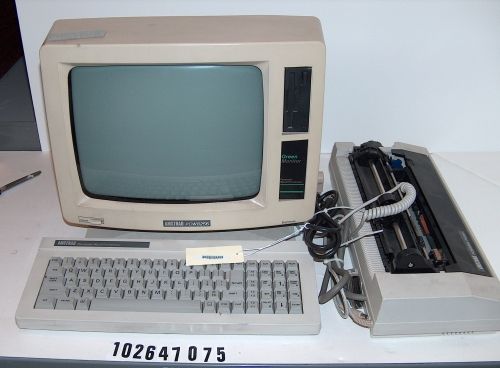
Of course, the word processor was not the initial introduction to typing that most people had (such as the typewriter), but it certainly was mine. I couldn't wait to type my school reports and watch the little white letters pop up on the screen. From then on we moved into a Dell computer, complete with Microsoft programs such as Word and Publisher. This was where my technology skills soared.
When I was in middle school I can remember learning how to type (anyone else remember asdf jkl; ?) and we had speed drills to practice our typing abilities. Although I became experienced at typing fairly quickly, I remained adamant about writing on paper first. I loved to journal and write my narratives by hand, and the technology seemed intimidating to me. I insisted that I couldn’t get my thoughts out while typing; I had to write by hand. While my peers were quickly navigating the internet and finishing homework two times faster than I completed mine, I felt reluctant to give in to the technology world. You could have classified me in the avoidance stage.
It wasn’t until college that I learned the significant positive effects typing could have on my writing. With online journals, class blogs, blackboard, instant messaging and of course the beginning of social media, my life changed dramatically. I was on my laptop most of the day, typing notes in class and communicating with peers online.
While I am not the most technologically savvy in my family (that role belongs to my older brother!), I feel that my competence has helped guide me in my education. If I tinker with a device or website for long enough, I can usually figure it out. The key is finding the time to learn as well as prioritizing the usage of technology available to me.
Interestingly enough, I didn’t get a cell phone until college and to this day do not own an IPAD. However, I have slowly gained an appreciation for the changes our world continues to make. I finally have a Nook and I hope to one day enter the wonderful world of the Mac. Until then, I am content to learn more about the new technologies that come about each year and incorporate the technologies available to me in my own classroom.
My first actual encounter with technology was with my radio and cassette player. My siblings and I would record our favorite songs, and then record ourselves singing in between the songs. Some time we would even record ourselves as the DJs, introducing the songs we loved the most. However, it wasn't until I was in the 4th grade that my family got our very first taste of the computer world--we bought a word processor!
Of course, the word processor was not the initial introduction to typing that most people had (such as the typewriter), but it certainly was mine. I couldn't wait to type my school reports and watch the little white letters pop up on the screen. From then on we moved into a Dell computer, complete with Microsoft programs such as Word and Publisher. This was where my technology skills soared.
When I was in middle school I can remember learning how to type (anyone else remember asdf jkl; ?) and we had speed drills to practice our typing abilities. Although I became experienced at typing fairly quickly, I remained adamant about writing on paper first. I loved to journal and write my narratives by hand, and the technology seemed intimidating to me. I insisted that I couldn’t get my thoughts out while typing; I had to write by hand. While my peers were quickly navigating the internet and finishing homework two times faster than I completed mine, I felt reluctant to give in to the technology world. You could have classified me in the avoidance stage.
It wasn’t until college that I learned the significant positive effects typing could have on my writing. With online journals, class blogs, blackboard, instant messaging and of course the beginning of social media, my life changed dramatically. I was on my laptop most of the day, typing notes in class and communicating with peers online.
While I am not the most technologically savvy in my family (that role belongs to my older brother!), I feel that my competence has helped guide me in my education. If I tinker with a device or website for long enough, I can usually figure it out. The key is finding the time to learn as well as prioritizing the usage of technology available to me.
Interestingly enough, I didn’t get a cell phone until college and to this day do not own an IPAD. However, I have slowly gained an appreciation for the changes our world continues to make. I finally have a Nook and I hope to one day enter the wonderful world of the Mac. Until then, I am content to learn more about the new technologies that come about each year and incorporate the technologies available to me in my own classroom.
Subscribe to:
Posts (Atom)